Ditunggu ya ka,,
data kamu lagi disiapkan
Memulai...


smarter.
Resolve faster.
Secure access only
Welcome back.
MiNAMA - Agent & Supervisor portal
Set Up Security PIN
Protect your account
smarter.
Resolve faster.
Secure access only
Forgot access
We will email you a secure reset link
Reset PIN
Follow the steps below to set your new PIN
📥 Check your email
A link was sent to your inbox. This link expires in 15 minutes and can only be used once.
smarter.
Resolve faster.
Secure access only
New joiner setup
Enter the email your admin registered for you
Hi, .
Create your secure 6-digit PIN
Hello
Thank you for signing in.
You can logout now.
Attendance
Today
Clock in colleagues who are at the office. Your own clock-in uses the daily screen.
Clock in colleague
Confirm?
| Claim ID | Loan / Debtor | Type | Agent | Submitted | Status | Action |
|---|---|---|---|---|---|---|
|
| ||||||
Attendance
| Date | Time | Agent | Action | Status | Reason / Note | Leave Period | Flag |
|---|---|---|---|---|---|---|---|
|
| |||||||
| Req ID sort | Type | Debtor sort | Agent / Req Time sort | Status sort | Action |
|---|---|---|---|---|---|
|
| |||||
| Req ID | Debtor | Agent / Req Time | Status | Action |
|---|---|---|---|---|
|
| ||||
Claim Requests
| Claim ID | Loan / Debtor | Type | Agent | Submitted | Status | Action |
|---|---|---|---|---|---|---|
| Loading... | ||||||
My Requests
| Req ID sort | Type | Debtor sort | Agent / Req Time sort | Status sort | Action |
|---|
PTP Dashboard
| Req ID | Loan / Debtor | Amount | PTP Date | Agent / Docs | Status | Action |
|---|---|---|---|---|---|---|
|
| ||||||
LiVEDB
Use the search above to find debtors | |||||||||
Assignments
Manager batch view for the selected Assign Date. Metrics reflect the current filter scope above.
Savings Dashboard
MORE ACTIONS
| Req ID | Loan / Debtor | Amount | Pay Date / Total Paid | Agent / Scheme | Approval | Receipts | Action |
|---|---|---|---|---|---|---|---|
|
| |||||||
Undetected payments
Off-system credits. Not counted as MiNAMA collection; edit/delete here.
| ID | Loan | Amount | Pay Date | Paid Off | Reason | By | Actions |
|---|
Collection trend by month
AkuLaku - LONGAN - Telekol - pre-2026 non-Aku -> LONGAN
Agents projection
Approved collections by agent for the selected month — includes team members with no collections yet (managers: all; Team Leaders: their team)
| # | Agent | Payments | Collected | AkuLaku | LONGAN | Telekol | PTP stock | EOM forecast |
|---|
Settings
Account & operational configuration
Email Connector Setup
Make your own copy of MasterConnector — one Apps Script project per Gmail (avoids Google “This app is blocked”).
Step 1 - Use the correct Gmail
Email will send from the Gmail account you copy and deploy with. Either:
- Open an Incognito window and sign in as that Gmail, or
- Switch Chrome to that Gmail profile on this computer.
Make a copy and deploy while logged in as the sender Gmail — not your manager's account. Confirm via the Apps Script profile badge.
Open MasterConnector template →Opens the shared template. On the next step you’ll Make a copy, then Authorize only on your copy.
Step 2 - Make a copy & deploy
-
Open the MasterConnector template (button on Step 1). Do not Authorize or Deploy on this shared template. Confirm Libraries → Master.
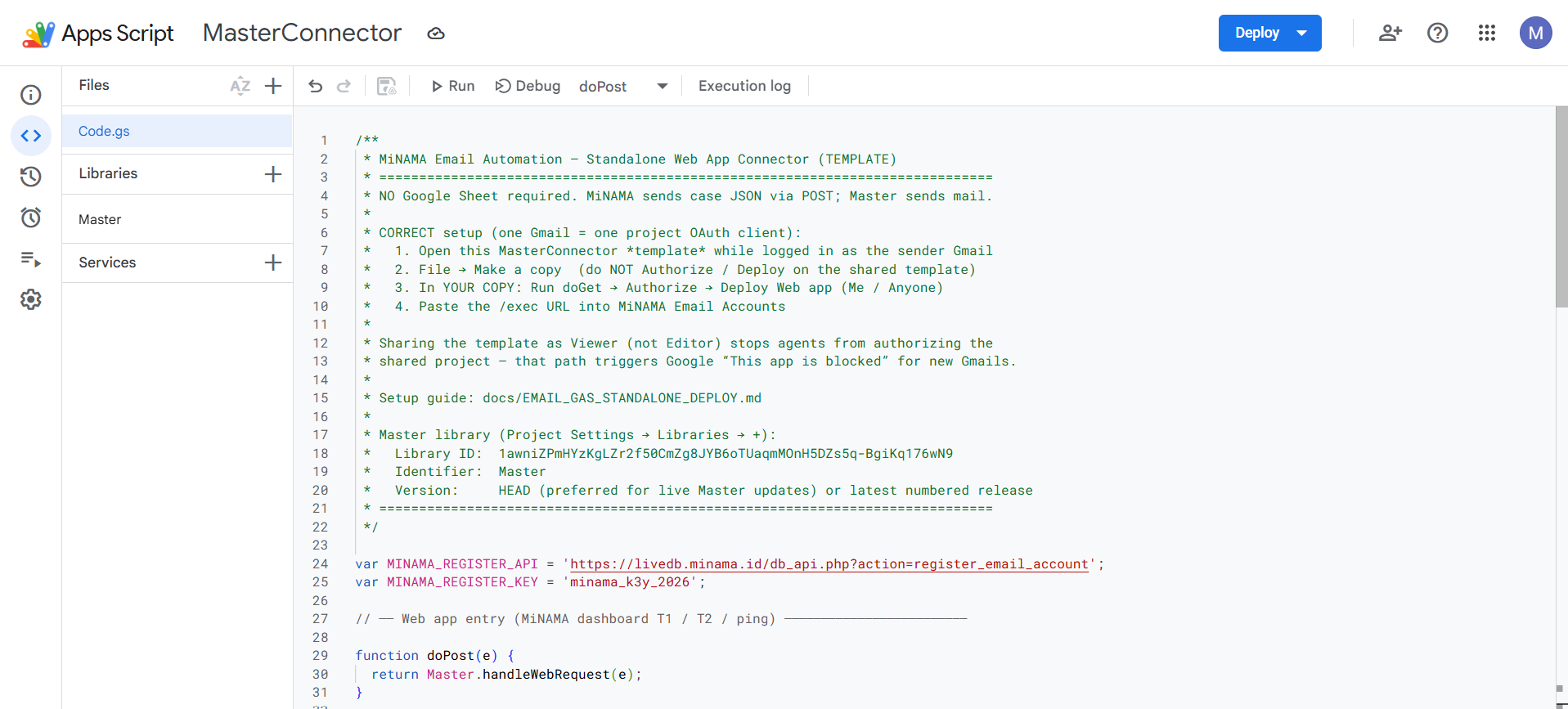
-
Click the profile badge (top right) — the Gmail shown must be the sender inbox you are attaching.
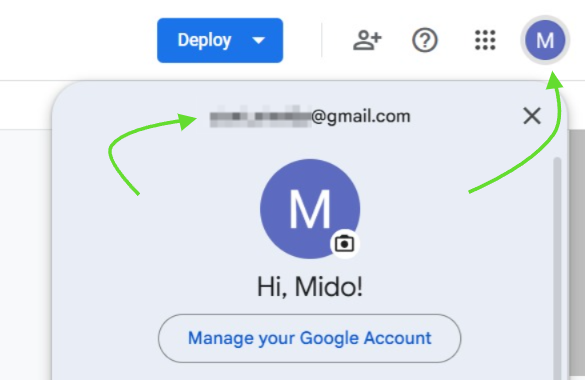
-
Open project Overview (ⓘ icon) → click the Make a copy icon. Work only in Copy of MasterConnector after this.
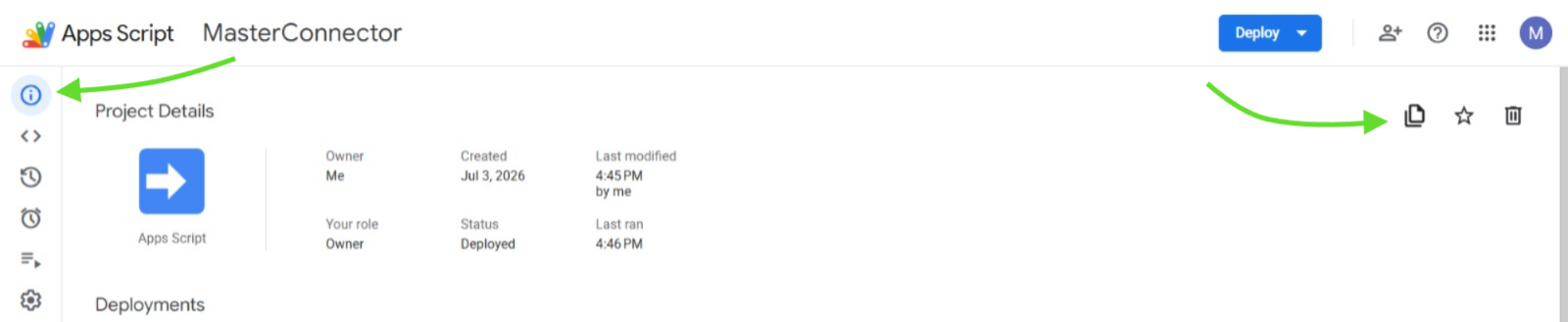
-
In your copy: Deploy → New deployment.
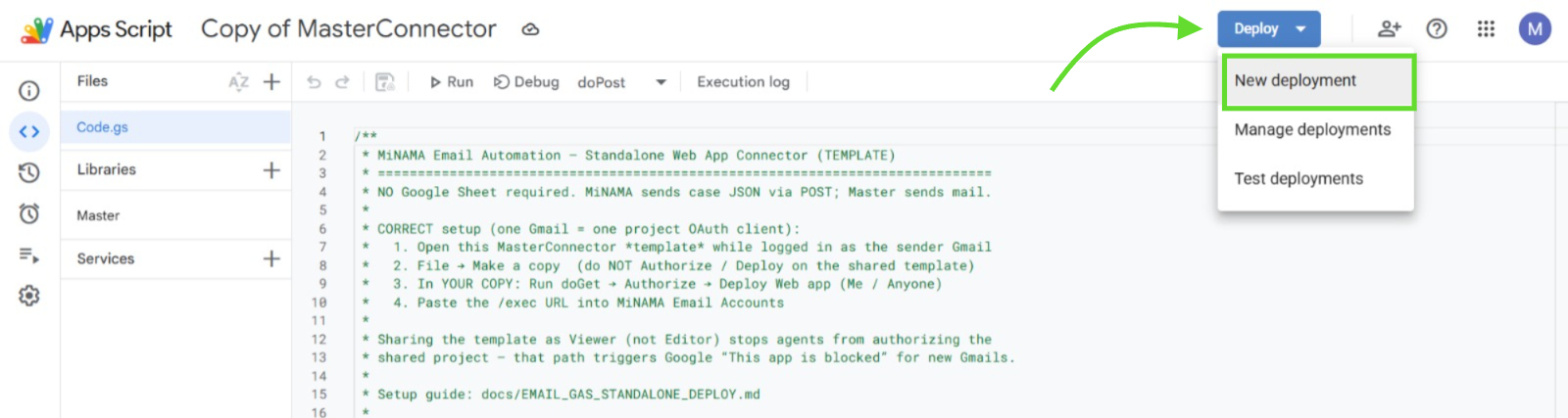
-
Type: Web app · Execute as: Me · Who has access: Anyone → Deploy.
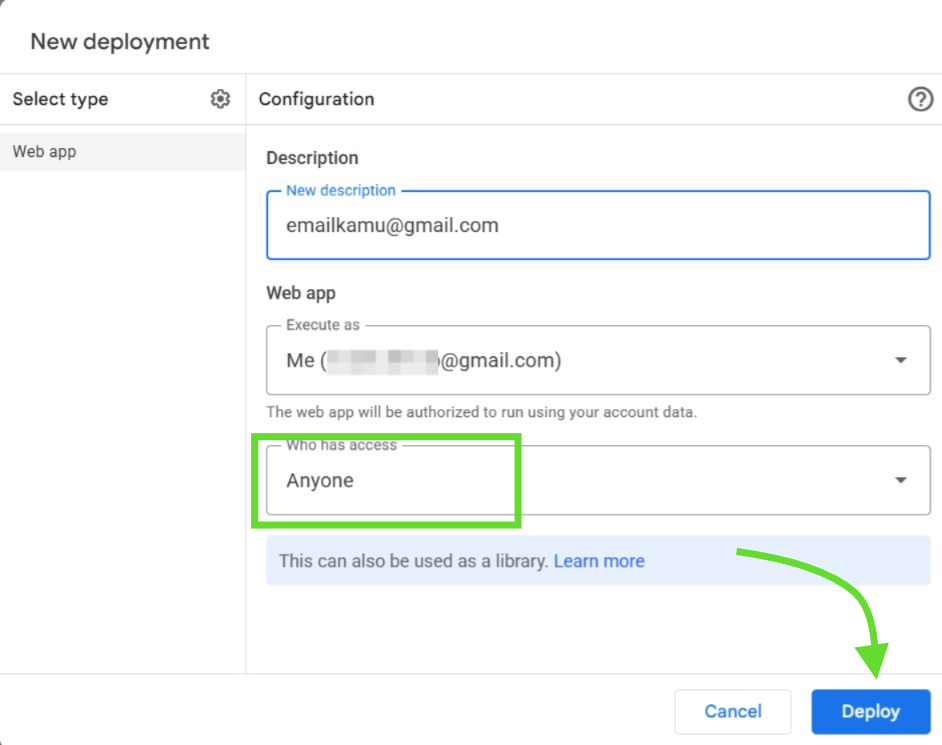
-
Click Authorize access.
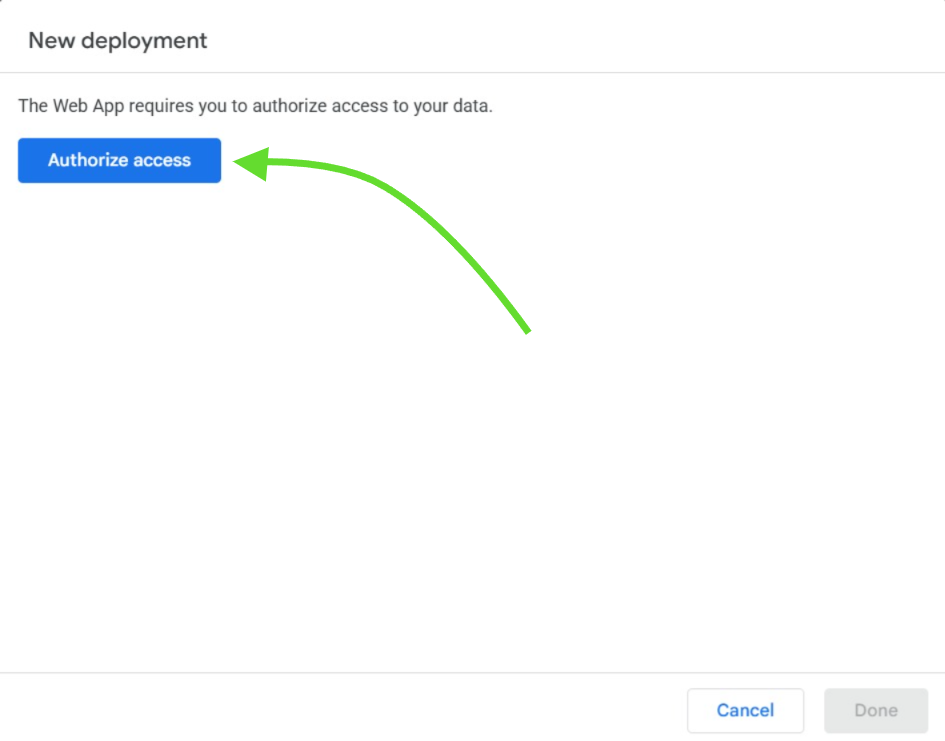
-
On “Google hasn't verified this app”, click Advanced, then Go to Copy of MasterConnector (unsafe).
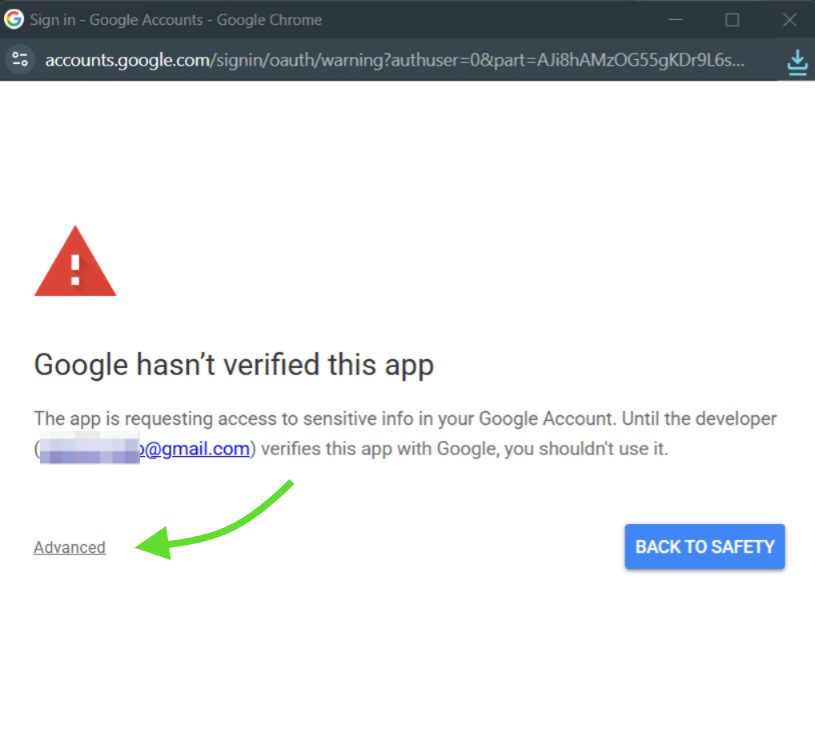
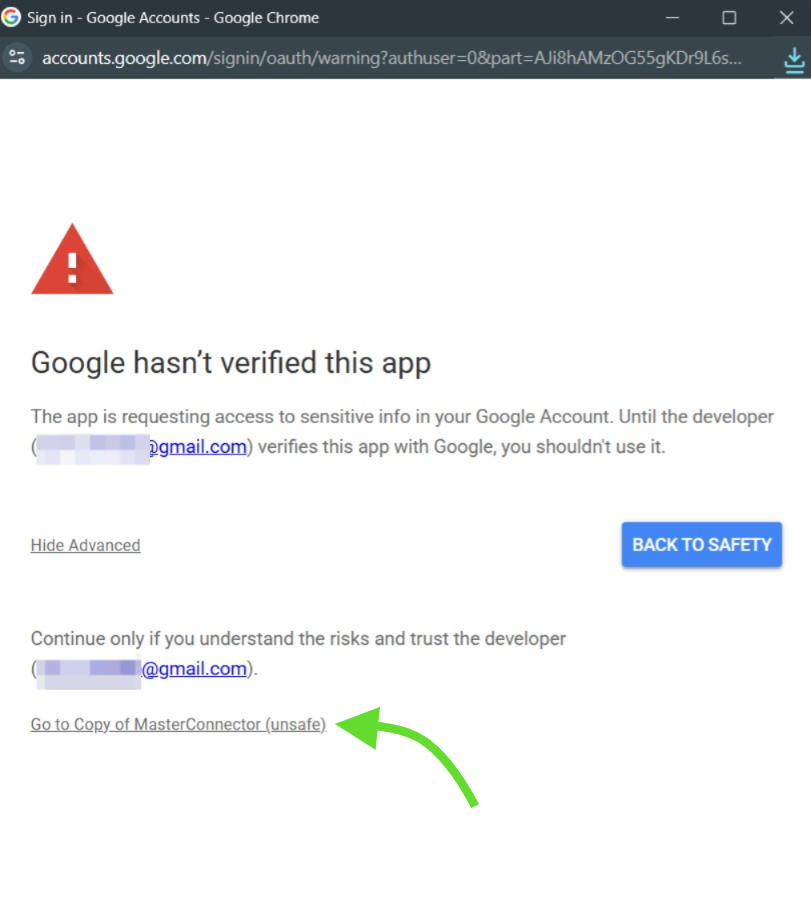
-
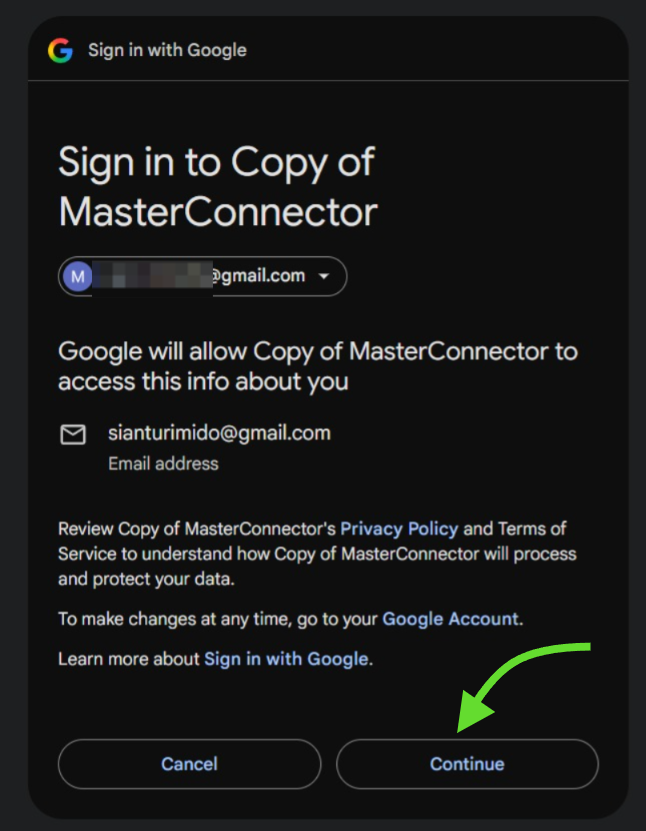
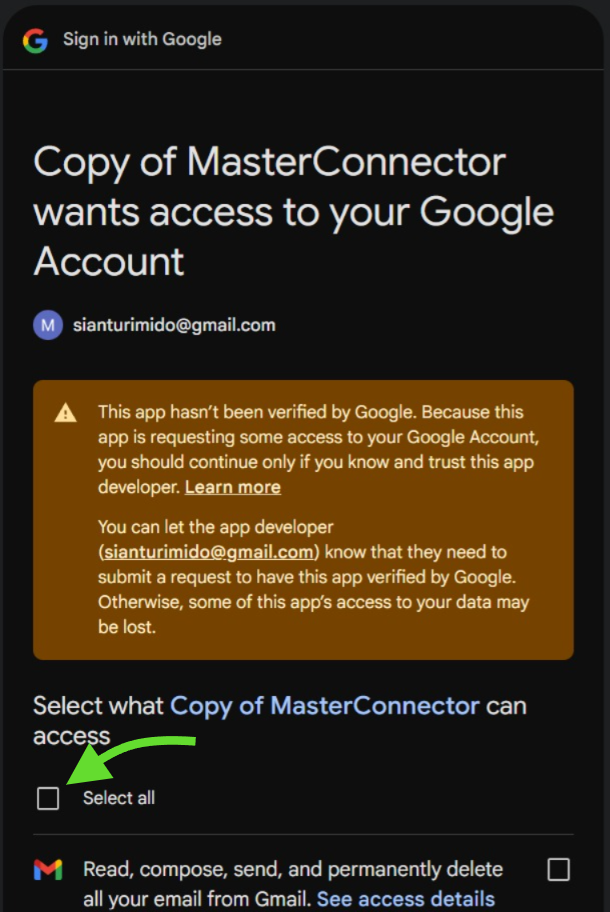
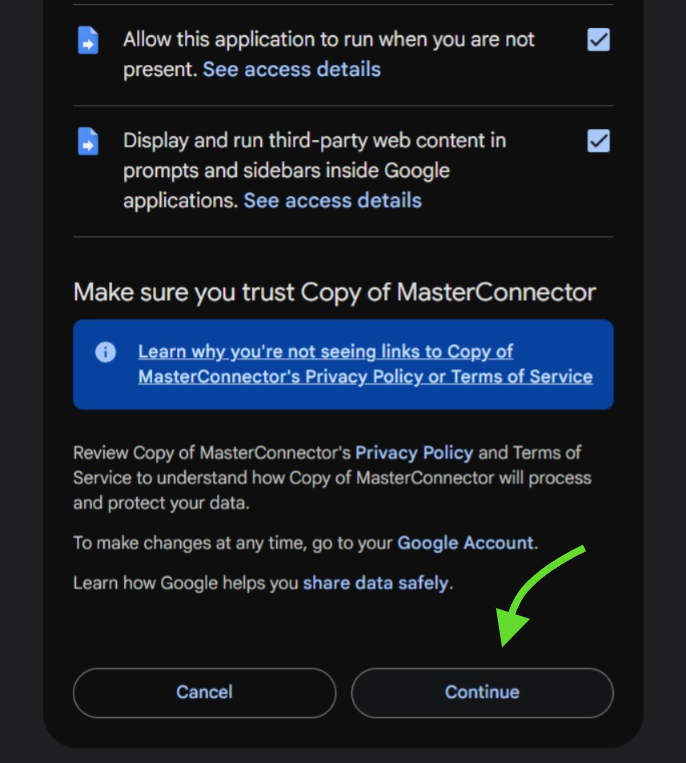
Click Continue → check Select all (Gmail) → Continue again.
-
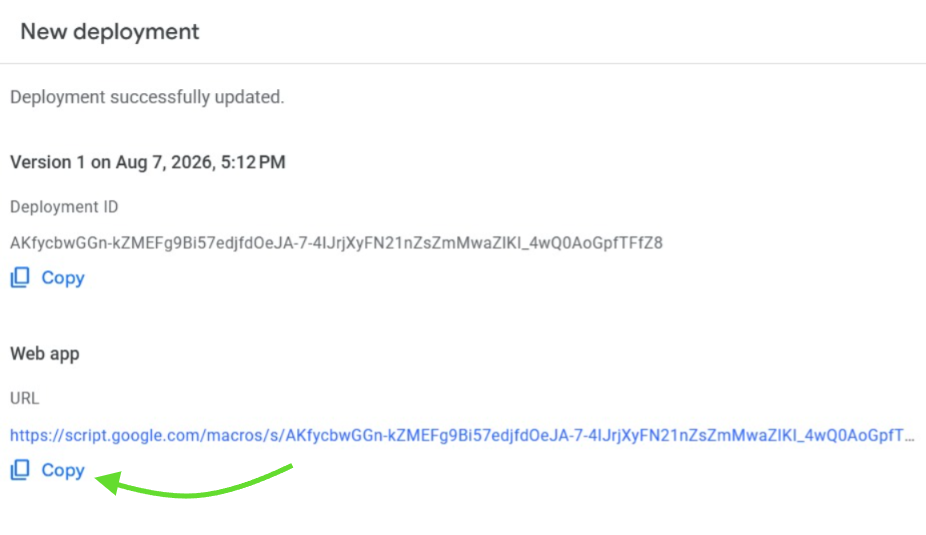
Copy the Web app URL (ends in /exec) — not the Deployment ID.
If Google shows a hard “This app is blocked” (no Advanced / unsafe link), you authorized the shared template instead of your copy — Make a copy and authorize only Copy of MasterConnector.
Managers (once): Share the MasterConnector template as Viewer (not Editor) so agents can open it and Make a copy, without deploying on the shared project.
Step 3 - Test & save Web App URL
Required. AkuLaku = only for AkuLaku T2 cases. Other = Telekol / Longan / rest.
Copy flagged emails
Attendance Summary
Select month
—| Employee | Scheduled | Present | Late | Leave | Absent | Compliance | Presence |
|---|---|---|---|---|---|---|---|
| Loading attendance summary… | |||||||
Scheduled = working days each employee is expected to attend this month (excludes Sundays, holidays in Settings, and Saturdays unless marked active). Expand a row for the daily ledger.
Attendance
| Date | Time | Agent | Action | Status | Reason / Note | Leave Period | Appeal | Flag |
|---|---|---|---|---|---|---|---|---|
| Loading... | ||||||||
Outside office area
You're not near the HQ pin yet.
Are you WFH, or at the office (retry location)?
Still outside office
Location still outside the HQ fence and not on the office network.
Move closer (≤50m) or connect to MiNAMAPrivateMesh, then try again~
Yahh kamu kenapa terlambat kaa?
ISI ALASAN DI BAWAH INI YAA
Selfie WFH
Ambil foto selfie untuk melanjutkan clock in WFH.
Kamera tidak tersedia. Unggah foto selfie.
Confirm Action
Confirm Payment Report
Please review before submitting
Fill at least one: Email, WhatsApp, or SMS.
Export Paid Off Cases
Download CSV: Loan Number, Last Payment Date, Total Paid in MiNAMA.
Add Undetected Payment
Credits an off-system payment for Pembayaran Terakhir / discount math only. It is not counted as MiNAMA Collected.
Set YES when this off-system credit closes the loan (required for SKL).
Report New Payment
Required on every Savings submission. Previous saved contact will load automatically and can be updated before submit.
Attach Receipt
Paste receipt image(s) below
Level Up Deviation
—
After a bug waiver, this is the agent's stage for the selected quarter (default: one level up).
Edit Payment Entry
-
Payment Detail
Request Case - Claim
Assign Case
Edit LiVEDB SQL Row
Manager edit writes directly to static columns in the livedb SQL table.
Configure Columns
Select which fields appear as table columns. Drag ⋮⋮ rows to reorder.
Configure Detail Card
Select fields shown in the expandable detail row. Drag ⋮⋮ rows to reorder.
Edit Photo
Drag to reposition
Create Task
Enter agent names, one per line. They will receive an email notification.
The system will look up debtor name and last payment date for each loan from paymentlog.
Create Task - Select Type
Choose the type of task to create. Each type has a different workflow.
Paid Off Confirmation
Automatically detect suspicious loans marked as "paid off" that may have discrepancies - OS mismatch, overpayment, or missing records.
Auto-detectManual Task
Manually enter task title, description, loan numbers, and tagged agents. Standard workflow.
Manual entryPaid Off Confirmation - Review Suspicious Loans
Only loans with last payment on or after this date will be evaluated.
Detecting suspicious paid-off loans...
Paid Off Confirmation - Tag Agents
Step 2 of 2
Auto-populated from loan payment submissions. Add or remove agents as needed.
Review quota
Notifications
0 unread
No notifications
Run Report
New Request
Choose request type
Edit Request
CEO / COO / Admin / Support
Request Supporting Documents
Enter loan number from your assignments
Extend Request
Enter any loan number to request a payment deadline extension
Report Leave of Absence
Fill in the details below
Request Leave
Submit a future leave of absence
Add New User
New Claim Request
Step 1 - Search Loan
Loan Summary
Loan Summary